Network · updated 18 June 2026
Why the film buffers at nine in the evening
Most streaming trouble I have been asked to fix had little to do with the app. It came from where the router sat, how the television reached it, and how many other screens were busy at the same moment. None of this needs special tools; a tape measure and patience help more.
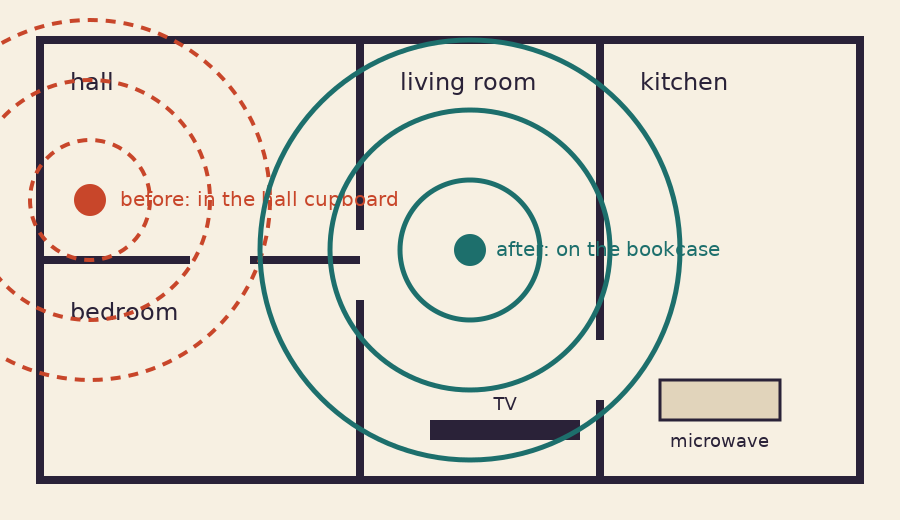
Where the router lives
A router shut in a cupboard or behind the television loses a surprising amount of signal. Lift it, keep it in the open and away from the fish tank, the microwave and thick walls.
A cable beats any setting
If the television is near the router, an Ethernet cable is the most dependable fix there is. Many sticks have no network port; some accept a small adapter with a port and a power socket, but check that your model supports one before buying. In our flat one cable ended a long argument about whose show kept buffering.
Wi-Fi bands in plain words
The 5 GHz band is faster over short distances and through one wall; 2.4 GHz reaches further but is crowded. If the picture stutters and your router allows it, give the 5 GHz band its own name and connect the TV to that.
The evening rush
At nine everyone is streaming, gaming and uploading at once. Lowering the quality on a second TV and leaving console updates for the night both help. A mesh kit makes sense for a long flat or several floors, but move the box closer first and see.
A two-minute check
Some TV apps and the network section of settings can show the connection quality of the TV itself; that is the number that matters. A phone speed test near the router and then at the sofa only tells you about the phone, but a big drop between the two spots still hints that the signal path, not the app or the account, is the weak point.