Remote · updated 30 October 2026
The remote, the phone and the buttons in between
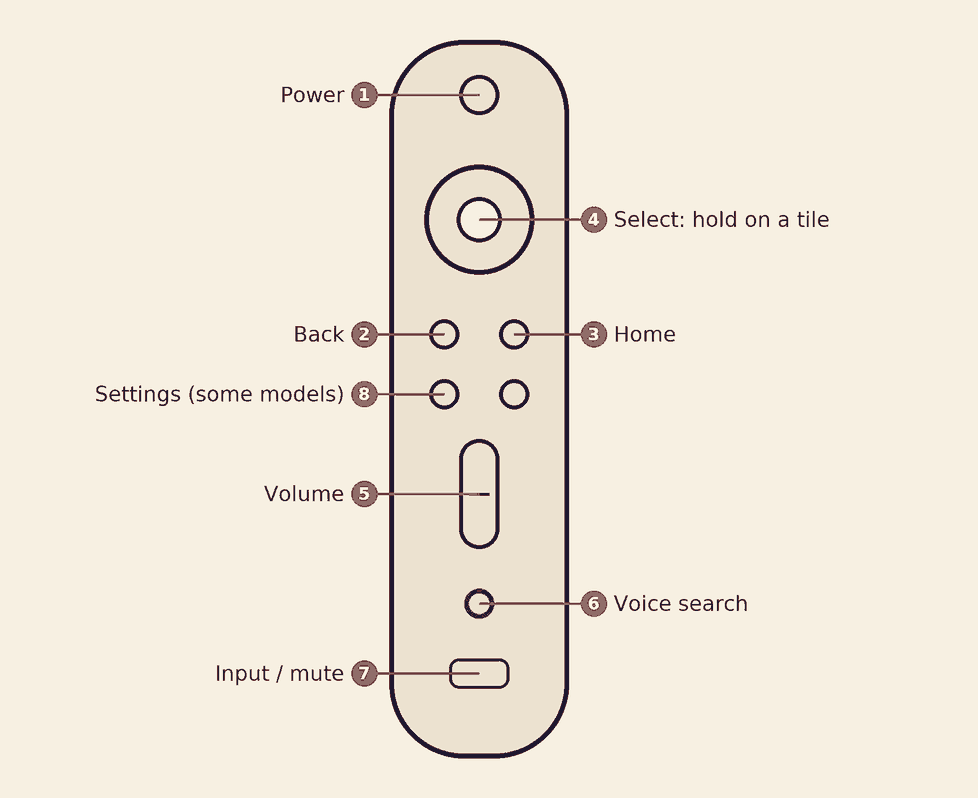
The remote in the box is designed to look simple, which means some useful actions are not obvious. Button sets differ between makers, and what a long press does depends on the model and even on the app that is open. The diagram is my own drawing of a typical layout, not a picture of any real product.
Presses worth trying
- Home (3): a short press returns to the home screen from inside any app.
- Select, held on a tile (4): on many launchers opens options to move the app or see its details.
- Long presses on Home or Back (2, 3): on some models open a quick panel or a shortcut. Try them once on your own remote; if nothing happens, your model simply does not use them.
- Voice (6): fine for titles, and far faster than spelling a film name letter by letter.
The phone as a remote
The Google TV app on a phone can act as a remote for a compatible device on the same home Wi-Fi. Its keyboard is the real reason to set it up: passwords and searches take seconds. For a guest, pairing their phone is often quicker than explaining the remote. The phone remote works only while the phone is on your home network, and the guest can remove the TV from the app on their side; check your own set's settings for any further list of paired devices, as this differs by model.
One remote for the cabinet
HDMI-CEC lets the television remote control a box or a sound bar over the HDMI cable. Every maker names it differently, so search the settings for CEC or a word like link or sync. When it works, everything switches on together. When the set wakes by itself at night, turning the feature off on one device usually ends it.
Small things
Keep spare batteries in the drawer with the remote. If a Bluetooth remote stops responding, pair it again from the accessories menu before buying a new one. A Bluetooth keyboard helps when you set up several accounts in one evening.